How to Deploy TIV 2 in Southern Mudding
How to deploy the TIV 2 in Southern Mudding on mobile or PC, identify the lowered skirt state, troubleshoot controls, and prepare for a tornado intercept.
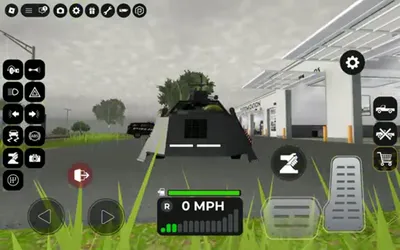
How do you deploy TIV 2?
Bring the TIV 2 to a complete stop, select its vehicle-specific action control, and wait for the protective skirts to lower around the sides and rear. A public Southern Mudding mobile clip shows the deployed body sitting close to the ground; when the skirts retract and the wheels are clearly exposed, the vehicle is no longer in that deployed state.
Southern Mudding can present different controls on mobile, keyboard, or controller. The public clip establishes the visible mobile action flow, but it does not establish one universal PC key. Follow the action prompt shown in your current HUD rather than copying an unsourced keybind.
Step-by-step deployment
- Spawn the TIV 2 and sit in the driver’s seat.
- Move to level ground with enough clearance around the full body.
- Brake until the speedometer reads 0 MPH.
- Find the vehicle action associated with the TIV’s deploy system. On mobile, use the relevant on-screen vehicle control; on PC or controller, read the live prompt or bindings shown for that action.
- Activate it once and watch the body.
- Confirm the skirts or panels lower toward the ground around the vehicle.
- Keep the vehicle stopped while the deployed state is in use.
- Use the same action to retract the system before normal driving.

Southern Mudding TIV 2 mobile deployment state
How to tell if TIV 2 is deployed
| Visual state | Meaning |
|---|---|
| Side and rear skirts lowered close to the ground | Deployed state shown in public gameplay |
| Wheels and underbody more exposed | Retracted or travel state |
| Animation still moving | Wait before deciding whether the input worked |
| Vehicle still rolling | Stop completely and try again on flat ground |
The visual state is more dependable than assuming a button press succeeded. Camera angle can hide one side, so rotate the view before entering the storm path.
Mobile, PC, and controller controls
Mobile
The public short uses the mobile HUD. Park, then use the vehicle action control associated with the deploy animation. Because several vehicle controls appear on screen, watch the skirts as you test rather than repeatedly tapping every action while moving.
PC
Open the current controls or keybind panel and look for the vehicle-specific action. If the game shows an interaction prompt when you sit in the TIV 2, use that prompt. A single keyboard key quoted without a current on-screen source may apply to an older build or another vehicle.
Controller
Use the action shown in the current controller prompt. If no prompt appears, stop, exit, re-enter the driver’s seat, and reopen the controls panel before resetting the vehicle.
Why deployment may not work
- You are still moving: brake to 0 MPH.
- The surface blocks the animation: move to flatter, open ground.
- You are in the wrong seat: use the driver’s seat.
- The input is mapped differently: follow the live platform prompt.
- The vehicle is already deployed: compare wheel exposure and skirt height.
- The server is behind the current version: join a fresh server and try once more.
- A UI panel has focus: close chat, shop, or customization panels before using the vehicle action.
Before a tornado intercept
Deployment is only one part of the route. Park on stable ground, face an escape direction, and leave enough time to deploy before conditions worsen. Do not assume the lowered skirts make the vehicle immovable under every in-game tornado condition.
Use the Southern Mudding tornado driving guide for route planning, retreat decisions, and the difference between server weather and player controls.
Sources
Related Southern Mudding Guides
Was this guide helpful?
Thanks for the feedback!