Southern Mudding Tornado Driving and Weather Guide
How to navigate a tornado in Southern Mudding, plan a TIV route, deploy before the intercept, retreat safely, and understand current weather controls.
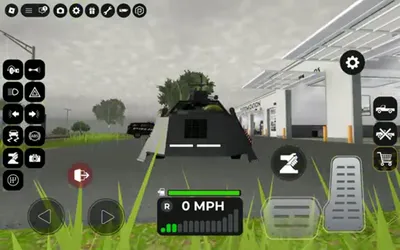
How to navigate a tornado in Southern Mudding
Treat the intercept as a route-planning problem. Choose an approach with open ground and more than one exit, stop before the tornado arrives, deploy the storm vehicle while stable, and leave before sliding or poor visibility removes your escape path.
This is gameplay advice for the Roblox experience, not real-world storm guidance.
A simple intercept plan
1. Observe before committing
Watch the tornado’s movement from a distance long enough to see whether it is crossing your road, moving parallel to it, or turning. One snapshot of its position is not a route.
2. Choose open, level ground
Level pavement or firm ground gives you a more dependable deployment surface than a muddy slope. Avoid narrow lots where you must reverse around obstacles to leave.
3. Face the escape route
Park so the vehicle can move forward into clear space. A fast exit is easier when you do not need a three-point turn in low visibility.
4. Stop and deploy early
Bring the TIV 2 to 0 MPH, use the vehicle-specific deploy action, and confirm the skirts lower. The TIV 2 deployment guide covers mobile, PC, and controller prompts without assuming one universal key.
5. Monitor the vehicle state
If the vehicle begins sliding, rotating, or losing ground contact, the position is no longer stable. Retract when the route allows and leave before control worsens.

TIV 2 deployment controls shown in Southern Mudding
When to retreat
Leave the intercept if any of these occur:
- the vehicle slides while deployed;
- the tornado changes direction across your only exit;
- visibility is too poor to see the road;
- another player blocks the escape line;
- your vehicle takes damage or loses normal controls;
- the server lags enough that steering and deployment feedback are delayed.
Retreating early is faster than resetting a vehicle and driving the whole route again.
Can players change the weather?
Current public Southern Mudding sources show dynamic storm gameplay, but they do not establish a normal, public-server change weather control available to every player. A video or post using a private server, staff command, or an older build is not proof that the same menu exists in your session.
Use this check:
- Open the current settings and server controls.
- Look for a clearly labeled weather option available to your account.
- Distinguish public-server settings from private-server or staff controls.
- If no option appears, wait for the server weather cycle rather than entering commands from a third-party page.
The official Roblox description can change each Friday, so an update may add or remove weather interactions later.
Vehicle choice
| Goal | Vehicle approach |
|---|---|
| Close tornado intercept | TIV 2 or another storm-specific vehicle you know how to deploy |
| Observe from distance | Stable road vehicle with predictable handling |
| Carry multiple players | Use enough seating without sacrificing control |
| Cross mud on the approach | Prioritize traction and clearance before speed |
| Cross water | Plan with a purpose-built water-capable vehicle, not an untested storm vehicle |
Do not mix a first-time vehicle test with a close intercept. Learn acceleration, braking, turning radius, and deployment on a clear lot first.
Troubleshooting storm controls
- Deploy action does nothing: stop completely, close other UI panels, and use the current vehicle prompt.
- TIV looks unchanged: rotate the camera and check skirt height and wheel exposure.
- Tornado never arrives: relocate only after observing the movement; do not chase every visual change.
- Weather differs from a video: the recording may be from another update or server condition.
- Vehicle cannot leave mud: retract when safe, straighten the wheels, and use gentle throttle rather than full wheelspin.
Sources
Related Southern Mudding Guides
Was this guide helpful?
Thanks for the feedback!